Fees and Comparisons
OKX vs Binance for Beginners: Fees, KYC and Which to Pick (2026)
OKX and Binance charge regular users almost the same spot fees. This guide puts the official numbers side by side, then helps you decide based on your country, payment method and goals.
Short answer: for a beginner who only buys and holds, OKX and Binance cost about the same. On the official fee schedules both charge a 0.10% taker fee to regular users on spot. OKX's maker fee is lower (0.08% vs 0.10%), and Binance cuts its fee to 0.075% if you pay with BNB. The bigger differences are whether the exchange serves your country, which deposit methods you can use, and how you will secure and withdraw from the account.
So the right pick depends on your own situation. Below you will find a side-by-side table checked against both exchanges' official pages, a worked fee example, and a six-point worksheet for the parts that differ from person to person.
OKX vs Binance at a glance (checked November 7, 2026)
Every number in this table comes from the exchanges' own pages, checked on November 7, 2026. Fees can change and can differ by region, so check the linked pages again before you trade.
| What you are comparing | OKX | Binance |
|---|---|---|
| Spot fee, regular user (maker / taker) | 0.08% / 0.10% | 0.10% / 0.10% |
| Fee discount for beginners | No token discount listed for the regular tier. Lower fees come from higher VIP tiers | 25% off when fees are paid in BNB, which gives 0.075% / 0.075% |
| Who counts as a regular user | Assets under $100,000 or 30-day trading volume under $1,000,000 | 30-day trading volume under $1,000,000 (VIP 0) |
| Proof of reserves | Monthly reports, verified with zk-STARK. You can check that your balance is included | Merkle tree plus zk-SNARK. You can check your balance under Wallet → Verification |
| Regional versions | Separate fee frameworks for some regions (for example the EEA, Singapore and Australia). Not every pair is offered everywhere | Restricted in some countries, and some regions have their own separate platform |
| Identity verification (KYC) | Both ask for identity verification before you can use most features. Which documents they accept depends on your country | |
Sources: OKX global fee framework, Binance fee schedule, OKX proof of reserves, Binance proof of reserves.
OKX vs Binance fees on a $1,000 spot buy
Percentages are easier to compare when you turn them into dollars. Here is the trading fee alone on a $1,000 spot purchase at the regular-user rates above:
| Order | OKX | Binance | Binance, fee paid in BNB |
|---|---|---|---|
| Market order (taker) | $1.00 | $1.00 | $0.75 |
| Limit order that waits on the book (maker) | $0.80 | $1.00 | $0.75 |
A market order fills right away at the best price available, so it pays the taker fee. A limit order that sits on the order book until someone fills it pays the maker fee.
The difference is under a dollar per $1,000. That is real, but small next to costs the table leaves out:
- Spread on simple "Buy" or "Convert" screens. These screens often build the cost into the price instead of showing a fee. Compare the amount of coin you actually receive.
- Card and third-party payment fees. Buying with a card can cost several times the trading fee.
- Withdrawal fees. These depend on the coin and the network, not the exchange's headline rate.
- Holding BNB. The Binance discount only works if you keep BNB in the account, and BNB's price moves like any other coin.
The fairest test is to run the same small example on both: deposit, buy, then withdraw part of it to a wallet, and compare what you end up with.
OKX vs Binance beyond spot: futures fees, P2P and wallets
Most "OKX vs Binance" comparisons stop at spot fees, but many people also ask about futures, buying with local currency, and self-custody wallets. Here is how the two line up on those, checked on November 25, 2026.
| What you are comparing | OKX | Binance |
|---|---|---|
| USDT-margined perpetual futures fee, regular user (maker / taker) | 0.02% / 0.05% | 0.02% / 0.05% |
| Futures fee discount | No token discount listed for the regular tier | 10% off when you pay futures fees in BNB, which gives 0.018% / 0.045%. The BNB has to sit in your USDⓈ-M futures wallet; if it runs out, Binance charges USDT at the full rate |
| What the futures fee is charged on | The full position value, not the margin. $100 of margin at 10x leverage is a $1,000 position, so you pay about $0.50 to open it with a market order and about the same again to close it, plus funding payments while it is open | |
| P2P trading (buy with local currency from other users) | Both run a P2P marketplace. Which currencies, payment methods and merchants you see depends on your country, so compare the actual offers for your currency | |
| Self-custody wallet | OKX Wallet, a separate self-custody wallet in the OKX app and as a browser extension | Binance Wallet, a self-custody wallet inside the Binance app |
Sources: Binance futures fee structure, OKX global fee framework. Futures fees, like spot fees, can differ by region.
What this means for a beginner:
- Futures fees are a tie at the regular tier. Binance is slightly cheaper only if you keep BNB in the futures wallet. The bigger cost of futures is usually liquidation, not fees. Read the spot vs futures risk guide before opening a leveraged position on either exchange.
- P2P is about the other person, not the exchange. The exchange holds the coins in escrow, but you pay the seller directly, so most problems come from payment disputes and frozen bank transfers. Our P2P trading risk checklist covers what to check before you pay.
- A self-custody wallet is not your exchange account. In both apps the wallet keys belong to you. If you lose the recovery phrase, neither OKX nor Binance support can get the funds back.
How to compare OKX and Binance for your own situation
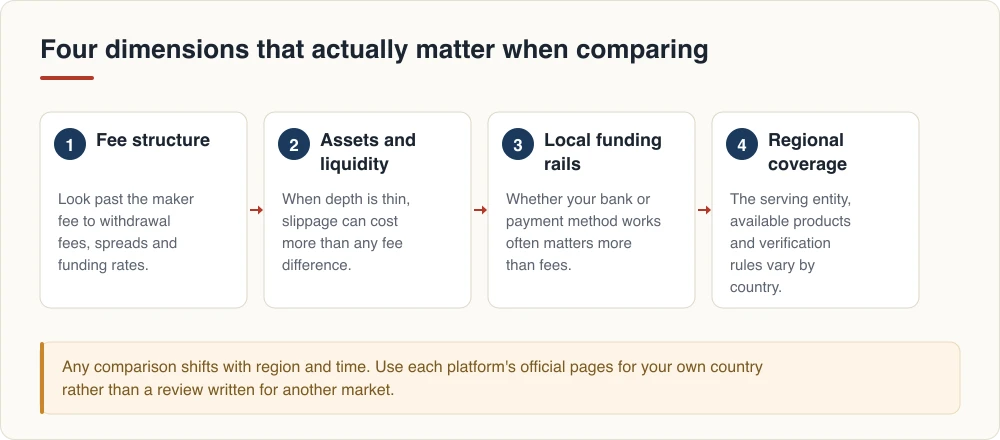
The table covers what is the same for everyone. The six points below differ from person to person. For each one, write down the answer for both exchanges from their official pages. If you cannot find an answer, treat it as "unknown", not "fine". If one exchange fails a point (for example, it does not serve your country), stop comparing it.
1. Is it available where you live?
This is a filter, not a feature. Exchanges can restrict countries, products, payment methods and campaigns. One may offer spot trading in your region but not derivatives or fiat services. Both OKX and Binance run some regions under separate entities with their own rules and fees.
- Check each exchange's official terms and its list of restricted regions.
- Do not use a VPN or borrowed identity to get around a restriction. It can get the account frozen with your money in it.
- For OKX, see Is OKX available in my country?
2. Can you complete identity verification on OKX or Binance?
Both ask for identity verification. Compare which documents each accepts for your country, what limits apply before and after verification, and whether the name on your payment method must match your account. If you cannot complete KYC with your own documents, do not register. For OKX, our OKX identity verification guide lists what to prepare, and the KYC pending or failed checklist covers what to do if review stalls.
3. What will it really cost you?
The spot rates above are only part of the bill. Add up, for the way you will use the exchange:
- Trading fee for your order type (market orders are usually taker orders).
- Spread or price difference on simple "buy" screens.
- Card or third-party payment fees.
- Withdrawal fees, which depend on the asset and network.
- Funding payments if you use perpetual contracts.
For OKX, start with the OKX fee schedule and our OKX fees guide.
4. Do you need the products it offers?
Both exchanges offer far more than a beginner needs: futures, options, margin, bots, copy trading and earn products. Most beginners need spot buying, simple conversion, deposits, withdrawals and good account security. More products are not an advantage if you will not use them, and leverage adds risks that are easy to underestimate. If you are considering futures, read the spot vs futures risk guide first.
5. Which security controls will you actually use?
Both publish proof of reserves, which shows customer balances are backed but says nothing about how safe your own login is. Compare the controls you will switch on:
- Two-factor authentication with an authenticator app.
- Anti-phishing code.
- Withdrawal address allowlist.
- Device management and login alerts.
- How account recovery works.
Most account losses come from reused passwords, fake apps and phishing messages, not from the exchange itself. See the OKX account security checklist.
6. How do you get money in and out?
This is often what decides it. Check, for your country and currency, which deposit methods each exchange supports, what the limits are, and how withdrawals to a bank or wallet work. Read the withdrawal rules and network options before you deposit, not after. See how to buy USDT on OKX safely and the USDT network guide.
Worksheet
| Question | OKX | Binance | Where to check |
|---|---|---|---|
| Available where I live? | Official terms and restricted-regions page | ||
| Can I complete KYC with my documents? | Verification flow | ||
| Total cost for my use case | Official fee pages | ||
| Products I actually need | Product pages | ||
| Security controls I will use | Security settings | ||
| Deposit and withdrawal routes for my country | Deposit and withdrawal pages |
OKX or Binance: which to pick for your use case
- You only want to buy and hold USDT or BTC: the fee gap is small, so points 1, 3 and 6 decide it. Choose the one that serves your country, shows the clearest total cost, and has a deposit route you trust.
- You plan to place limit orders: at regular-user rates OKX's maker fee (0.08%) is lower than Binance's standard 0.10%. Binance comes out lower (0.075%) only if you hold BNB and pay fees with it.
- You are interested in derivatives: confirm availability for your region first, then read the risk guide. Many beginners are better off not starting there.
- You already hold coins elsewhere: compare withdrawal and network options, and move a small test amount first.
Also weighing Bybit? Our OKX vs Bybit comparison puts both exchanges' spot and futures fees, proof of reserves and country limits side by side.
About referral links
Referral benefits should be your last check, not your reason for choosing. If you decide on OKX, you can confirm code OK6667 and whatever benefit OKX currently shows on its sign-up page. See the referral code guide.
Create your OKX account (code OK6667)
Disclosure: XSNeo is independent from OKX, Binance, Bybit and any other exchange mentioned. We may earn a commission if you register through this link, at no extra cost to you. Rewards are subject to OKX's official terms. See our affiliate disclosure and risk disclosure.
FAQ
Is OKX or Binance better for a first-time buyer?
Neither wins for everyone. Their spot fees for regular users are close, so the deciding factors are which one serves your country, which deposit method you can use, and the total cost you see for your own purchase. Fill in the worksheet above for both.
Which has lower fees, OKX or Binance?
For regular users, both charge 0.10% for spot taker orders. OKX's spot maker fee is 0.08% against Binance's 0.10%. Paying fees with BNB on Binance takes 25% off, to 0.075% for both maker and taker. These are the official rates as of November 7, 2026, and they can differ by region.
Is OKX or Binance cheaper for futures?
At the regular tier they charge the same for USDT-margined perpetual futures: 0.02% maker and 0.05% taker. Binance takes 10% off if you pay futures fees in BNB held in the futures wallet, which gives 0.018% and 0.045%. Rates checked on November 25, 2026, and they can differ by region.
Is OKX safer than Binance?
Both publish proof of reserves and let you check that your own balance is included. Neither can protect an account with a reused password or a leaked 2FA code. For most beginners, how well you set up 2FA, an anti-phishing code and a withdrawal allowlist matters more than which exchange you pick.
Do I need to verify my identity on OKX and Binance?
Yes. Both ask for identity verification before you can use most features, and each account is verified separately. Accepted documents depend on your country.
Can I use both OKX and Binance?
Many people do, but each account needs its own verification and security setup. Only open what you will actually use.
Does a referral link change KYC or eligibility?
No. It does not remove verification requirements or make a restricted region eligible.
Bottom line
On fees alone, OKX and Binance are close for a beginner: OKX is slightly cheaper for limit orders, and Binance is slightly cheaper if you pay fees with BNB. The best exchange for you is the one you can legally use, verify honestly, secure properly and understand before you deposit. Answer the six questions for both, and let the answers decide.
Digital assets are volatile and high risk. This article is educational and is not financial, legal or tax advice.