
Account Security
OKX KYC Pending or Failed? A Practical Verification Troubleshooting Guide
A decision-based guide to OKX identity verification issues, including document quality, duplicate identities, camera problems, unsupported regions, and safe escalation.
Reviewed on July 12, 2026. Verification requirements differ by country, account type, and the OKX entity serving you. Follow the instructions shown inside your own account.
An OKX identity check can be pending, rejected, or blocked before submission. Those states look similar from the outside, but they require different fixes. Re-uploading the same file repeatedly is rarely the best first step.
Identify the exact state first
| Status or symptom | Likely meaning | Best first action |
|---|---|---|
| Pending or under review | The submission has been received | Wait for the stated review window and monitor email |
| Rejected with a reason | One or more checks failed | Correct that specific issue before resubmitting |
| Camera will not open | App or device permission problem | Check permissions, browser/app version, and network |
| Identity already used | The document may be linked to another account | Do not create more accounts; contact official support |
| Country or document unsupported | Eligibility or document-type issue | Confirm the applicable OKX terms for your region |
Start by reading the rejection message and the email sent to the address on your account. Record the wording exactly. A generic “KYC failed” description is not enough for support to diagnose the case.
Document problems that cause avoidable rejections
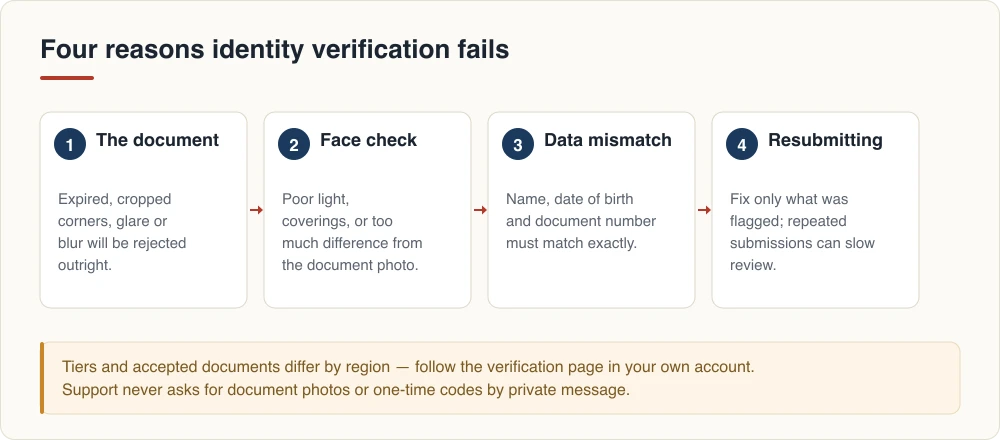
The document should be original, current, fully visible, and supported by the verification screen. Common failures include an expired ID, cropped edges, glare across security features, blur, a dark image, or information covered by a finger.
Do not upload a screenshot of a photograph, a black-and-white printout, or a heavily compressed image. Clean the camera lens, use neutral lighting, place the document on a plain contrasting surface, and keep all four corners visible. Do not digitally retouch the image.
The spelling, date of birth, and document number must match the information you enter. Transliteration rules can vary, so follow the format requested on screen rather than inventing an English spelling.
Selfie and face-recognition failures
Selfie checks can fail because the face is partly covered, lighting is uneven, the camera is moving, or the person does not follow the motion prompt. Remove hats and tinted glasses, face a soft light source, and keep the entire face inside the frame.
If the camera does not launch, verify camera permissions for the OKX app or browser. Update the official app through its legitimate app-store listing. Avoid remote-control software, virtual cameras, beauty filters, and screen recordings during verification.
Never let another person complete the selfie for you. Using someone else’s identity can violate platform rules and local law, and it can make later withdrawals or account recovery much harder.
Duplicate identity or multiple-account messages
OKX says an identity may only be associated as permitted by its account rules. If you previously opened an account, creating additional accounts is not a reliable workaround. Search your email for old registration messages and use the official account-recovery process.
When contacting support, explain whether you recognize the earlier account. Do not send an unredacted ID through social media, Telegram, WhatsApp, or an email address supplied by a stranger.
Pending for longer than expected
First check whether OKX has requested more information. Also confirm that your app shows the submission as received. If the displayed review window has passed, contact support from the in-app assistant or the official Help Center.
Prepare these details:
- The verification status and exact error message.
- Submission date and time with time zone.
- Document type and issuing country, without posting the document publicly.
- App version, device model, and operating system.
- A screenshot of the error page with sensitive numbers masked.
- Any case number already issued by OKX.
Country and age eligibility are not technical errors
Some products or the platform itself may not be available in a country or to a particular customer. A VPN does not change legal residence, identity, tax status, or eligibility. Do not falsify an address or borrow documents to bypass a restriction.
Before signing up through any invitation, check the entity, terms, product availability, and identity requirements shown for your location. Rewards and referral eligibility also vary by campaign and region.
For a broader pre-registration checklist, see Is OKX available in my country?.
Security reminders
Legitimate verification does not require your seed phrase, private key, withdrawal password, or a payment to “unlock KYC.” Support agents should not ask you to transfer crypto to a verification wallet. If someone contacts you first and creates urgency, leave the conversation and open support from the OKX app yourself.
Official sources
- OKX: Why did my identity verification fail?
- OKX: Detailed identity-verification troubleshooting
- OKX referral program FAQ
This article provides operational and security information, not legal, tax, or investment advice. Crypto assets involve substantial risk. XSNeo is independent and is not OKX customer support.