
OKX Guides
Crypto Deposit Missing on OKX: TxID Troubleshooting From Sender to Account
A sender-to-account troubleshooting workflow for missing OKX crypto deposits, covering TxID status, network matching, addresses, memos, minimums, and support evidence.
Reviewed July 12, 2026. Supported networks, minimum deposits, and confirmation requirements change by asset and region. Use the values displayed in your account.
A missing crypto deposit is not one problem. The transfer may still be inside the sending platform, pending on the blockchain, confirmed on the wrong network, or waiting for OKX to credit it. The TxID tells you where to start.
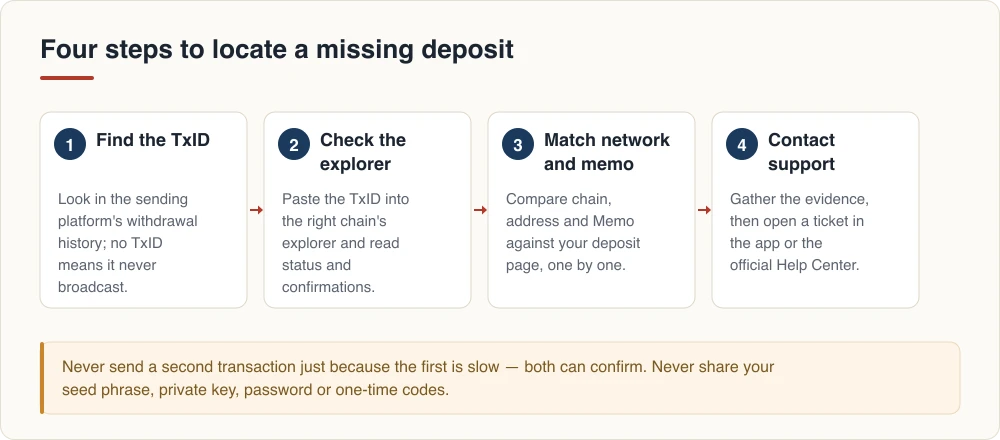
The four-layer model
- Sender: Did the wallet or exchange actually broadcast the transfer?
- Blockchain: Is the transaction pending, failed, or confirmed?
- Deposit details: Do asset, network, address, and memo match?
- Crediting: Has OKX received enough confirmations and processed the deposit?
Skipping directly to customer support often produces a slow back-and-forth because the case lacks the information needed to identify the layer.
No TxID means there may be no on-chain transfer yet
Open the withdrawal history on the sending platform. Find the entry and look for TxID, transaction hash, or a block-explorer link. An order number or internal payment reference is not a blockchain TxID.
If the sender says Processing and provides no TxID, contact the sender. OKX cannot trace a transaction that has not been broadcast to a blockchain.
Read the block explorer without guessing
Use an explorer for the selected network. Check:
- transaction status;
- token and amount;
- receiving address;
- block confirmations;
- memo or destination tag when the network uses one.
Pending means the network has not finalized the transaction. Failed generally means the intended transfer did not execute successfully. Success means the chain processed it, but the deposit still needs to satisfy the receiving platform’s rules.
Do not send a second transfer just because the first is pending. Two transactions can both confirm later.
Match the network at both ends
Token tickers can exist on multiple chains. USDT on one network is not automatically interchangeable with USDT on another. The withdrawal network selected by the sender must exactly match a network currently supported on the OKX deposit page for that asset.
Reopen the deposit page instead of relying on an old screenshot. Compare the network label, address, and token contract information shown by OKX. A low network fee does not make an unsupported network safe.
If you used the wrong network, stop. Blockchain transfers are normally irreversible. File a ticket through the official Help Center, but treat recovery as uncertain and never pay a stranger who guarantees retrieval.
Address, memo, and minimum amount checks
Compare the receiving address recorded on-chain with the address generated by OKX. Check the beginning, middle, and end rather than only the final characters.
Some assets require a memo, tag, or comment in addition to the shared deposit address. If OKX displays one, it must be entered exactly at the sending platform. A missing or incorrect memo may prevent automatic crediting.
Also confirm the transfer met the minimum shown on the deposit page. Do not rely on a static number from an article because minimums can change.
When everything matches but the balance is absent
The blockchain may be confirmed while OKX is still syncing the network, waiting for more confirmations, performing a compliance check, or temporarily suspending deposits for maintenance. Check deposit history and any network notice in the app.
If the displayed requirements have been met, prepare a concise support package:
- Full TxID.
- Asset and amount.
- Network.
- Deposit address and memo/tag if applicable.
- Sending time with time zone.
- Screenshots of the sender record and explorer result with unrelated personal data hidden.
Open support from the OKX app or official website. A legitimate agent does not need your seed phrase, private key, login password, or a transfer to a “verification address.”
A safer routine for future deposits
- Generate or confirm the address from the current deposit page.
- Match asset, network, address, and memo as four separate checks.
- Use a test transfer for a new route when fees and minimums permit.
- Stop if the pasted address changes unexpectedly.
- Keep the TxID until the asset is credited and usable.
Users still evaluating the platform can review the OKX sign-up and reward verification guide before opening an account.
Official sources
- OKX: Why hasn’t my deposit arrived yet?
- OKX: Find a deposit address and tag or memo
- OKX: Make a crypto deposit in the app
This is operational and security education, not investment, legal, or tax advice. On-chain transfers may be irreversible and crypto assets can lose value.