OKX Referral Codes
OKX Referral Code: Where to Enter It, and Can You Add It Later?
Enter the OKX referral code in the optional referral field while you sign up, on the website or in the app. OKX says it can't be added or changed once the account exists, so check it before you submit.
Short answer: type or paste the code into the Referral code (optional) field on the OKX sign-up screen, on the same step where you enter your email or phone number. If you open an invitation link, the code is usually filled in for you. You cannot add it later: OKX's help center says a referral code must be added before the account is created and can't be added or changed afterwards.
Any benefit attached to the code, such as a welcome reward or fee discount, depends on your country, the campaign period and your account. Treat it as something to confirm on OKX, not as a promise. This guide covers where the field is on the website and in the app, what to do if you already registered without a code, and why a reward may not show up.
Last checked: November 19, 2026, against OKX's Referral Program FAQ.
Quick answer
An OKX referral code is an invite code or a tracked sign-up link. If a campaign is available to you, registering through it may unlock a reward or fee-related benefit. XSNeo does not guarantee any benefit. The sign-up page and OKX's official terms decide what applies to you.
Where to enter the OKX referral code on the website
- Open the OKX sign-up page, ideally from the invitation link so the code is carried over.
- Choose your country or region of residence and continue.
- On the step where you enter your email or phone number, look for Referral code (optional). On some layouts you need to click it to expand the field.
- Check that the field shows the code you meant to use. If it is empty, paste the code in.
- Only then submit the email or phone verification and continue.
The layout can differ slightly by region and over time. If you can't see the field, look for small text you can tap or click before assuming it isn't there.
Where to enter the OKX referral code in the OKX app
In the app the field sits in the same place: after you pick your region, the screen where you type your email or phone number has an optional referral code entry. The difference is how the code gets there.
- Link first, then app: a common path on phones is to tap an invitation link in the browser, get sent to the app store, install OKX and start sign-up again inside the app. The app may not know about the link you tapped, so the referral field can be empty. Paste the code manually before you continue.
- Sign up in the browser, use the app later: another option is to finish registration in your phone's browser through the invitation link, then download the app and log in. The referral is recorded during web sign-up; the app is only used to log in.
- Install from official sources only: get the app from the official OKX website or your phone's official app store, not from an APK someone sends you.
Already registered without a referral code?
OKX's Referral Program FAQ says the referral relationship usually can't be added or changed after registration is complete. In practice this means:
- There is no menu in an existing account where you can enter a code afterwards.
- Support generally cannot attach a code to an account that already exists.
- Do not open a second account just to use a code. Duplicate accounts can break OKX's terms, fail identity verification (one person, one verified account) and make you ineligible for rewards anyway.
Welcome rewards for new users are tied to your own account and tasks, so check your rewards section even if no code was recorded. What you see there is what applies to you.
Check these before you use any referral link
- Your country or region is supported. If you are unsure, read Is OKX available in my country? first.
- You are allowed to use digital asset services where you live, and you meet the local age requirement.
- You can complete identity verification with your own documents. See the OKX identity verification guide.
- You understand that crypto is high risk and prices can fall sharply.
- The offer is visible on the official sign-up page before you submit.
If any of these is unclear, read OKX's Terms of Service and risk disclosure before going further.
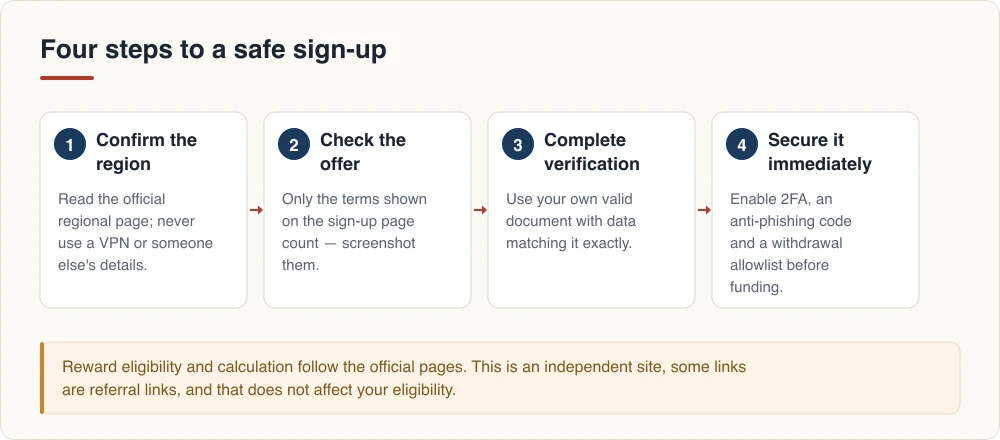
How to register with a referral code
- Open the referral link from a page you trust.
- Check that the address bar shows an official OKX domain.
- Look for the referral code, reward or fee discount on the sign-up page.
- Register with your own email or phone number.
- Use a strong password you do not reuse anywhere else.
- Complete identity verification only inside the official OKX app or website.
- Turn on two-factor authentication before you deposit.
- Read the fee schedule and withdrawal rules. Our OKX fees guide explains what to look for.
What a referral code can and cannot do
| It may | It does not |
|---|---|
| Give a fee discount for a limited period, where OKX offers one | Remove identity verification |
| Qualify you for a welcome campaign, if you meet its conditions | Make a restricted region eligible |
| Link your sign-up to the referrer for any commission OKX pays | Guarantee profit or a fixed bonus |
Benefits, durations and conditions change. Check the campaign text on OKX and, after you register, the rewards or fee section inside your account.
Use the XSNeo invitation link
If OKX is available where you live and you understand the risks, you can register here: Register with the XSNeo OKX invitation link
Invite code: OK6667. Whether it takes effect, and what it applies to, is decided by OKX. Confirm it on the sign-up page before you submit.
Disclosure: XSNeo may earn a commission if you register through this link. It does not add to your costs. XSNeo is an independent site and is not OKX. See our affiliate disclosure and risk disclosure.
How to check the code actually applied
- After opening the link, confirm the domain is
okx.com. - Look for
OK6667or another invite marker on the sign-up page. - Before you submit, read any campaign text OKX shows, and save a screenshot if you want a record.
- After registering, look in your account's rewards, fee or campaign sections.
- If the page shows no benefit, go by what OKX shows, not by any third-party page.
OKX referral reward not showing? Common reasons
According to OKX's FAQ, referred users get their own Welcome Rewards, tracked under Rewards > Welcome Rewards in the account, and task and reward statuses update within 48 hours after an eligible transaction. If yours hasn't appeared, check these in order:
| Reason | What to check |
|---|---|
| Less than 48 hours have passed | Wait until 48 hours after the qualifying deposit or trade, then look again |
| A task is not finished | Open the rewards page and see which step is still incomplete, such as identity verification, a deposit or a first trade |
| The campaign deadline passed | Rewards must be completed or claimed within the campaign period shown on the page |
| The code was not recorded | You signed up through a different channel, or the field was empty when you submitted |
| Region or eligibility rules | Some regions don't support the program, and cross-region invitations may not qualify |
If more than 48 hours have passed and every task shows as done, contact OKX support through the official app or website. Never send your password, verification codes or ID to anyone offering to "recover" a reward for you.
Still deciding between OKX and another exchange?
A referral reward is a small part of the decision. Fees, availability in your country, identity verification and the products you need matter more. If you are comparing options before you register, read OKX vs Binance for beginners and OKX vs Bybit for beginners.
Anti-scam checklist
- Never share verification codes, passwords, seed phrases or ID documents with anyone offering to help you register.
- Do not send money to anyone on Telegram, WhatsApp, Discord or in direct messages.
- Be wary of promises like "guaranteed cashback" or "VIP channel".
- Do not install unofficial APKs, browser extensions or remote-control software.
- Do not buy accounts or let someone complete verification for you.
When you should not register
Stop if your location is restricted, if you cannot complete KYC honestly, if you do not understand the risks, or if the product you want is not available to you. No referral benefit is worth bypassing eligibility or safety checks.
Read alongside
- OKX Terms of Service
- OKX Risk and Compliance Disclosure
- OKX Fee Schedule
- OKX Proof of Reserves
- OKX Help Center
- OKX Referral Program FAQ (checked November 19, 2026)
FAQ
Is the referral benefit guaranteed?
No. Eligibility, calculation and availability are controlled by OKX and must be confirmed on the official page.
Can I add an OKX referral code after I have registered?
No. OKX says the referral code must be added before the account is created and can't be added or changed afterwards. Check the referral field before you submit sign-up.
Where is the referral code field in the OKX app?
On the sign-up screen where you enter your email or phone number, after choosing your region. It is marked as optional and may need a tap to expand.
How long does an OKX referral reward take to show?
OKX says task and reward statuses update within 48 hours after an eligible transaction. Contact OKX support if it is still missing after that.
Should I use a VPN to access OKX?
No. Using a VPN, false documents or someone else's account to bypass restrictions can lead to restricted accounts, delayed withdrawals and lost rewards.
Is XSNeo an official OKX website?
No. XSNeo is an independent educational site and may earn compensation through referral links.
Bottom line
A referral code is worth using only if you are eligible to use OKX and the offer is shown on the official sign-up page. Verify the domain, check the offer, read the terms, secure your account, and deposit only after you understand the risks.
Digital assets are volatile and you can lose some or all of your money. This article is educational and is not financial, legal or tax advice.